
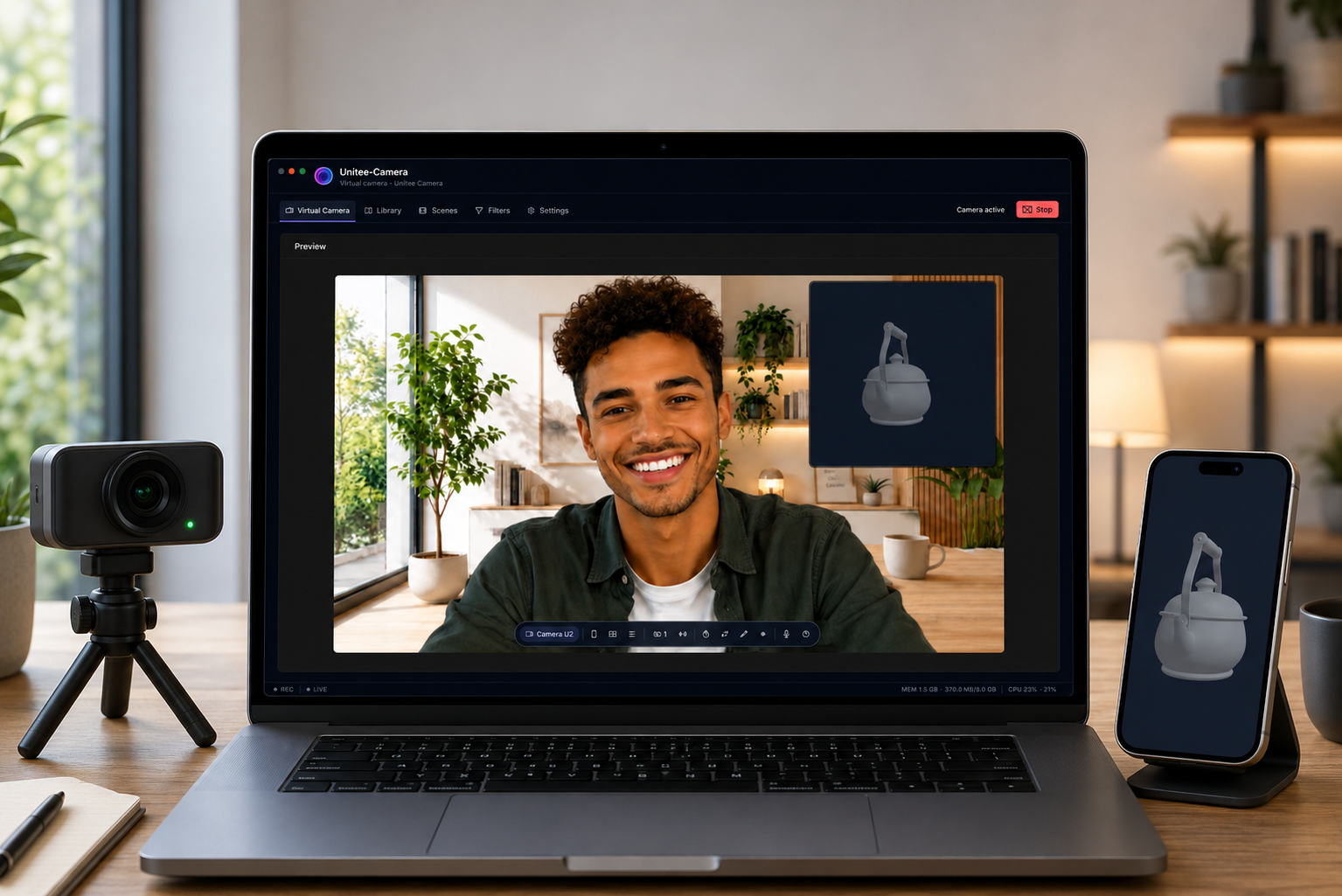
Unitee-Camera: The Cockpit for Professional Video Meetings
Transform your camera into a virtual presentation studio to compose, control, and broadcast your professional video presence.
Unitee Team
Product
Introduction
In a video conference, a great presentation is no longer just about turning on your webcam. You need to be able to explain, demonstrate, illustrate, and stay connected with your audience—without juggling multiple windows, sharing your entire screen, or interrupting your flow.
Unitee-Camera turns your camera into a true virtual presentation studio. The application becomes the cockpit from which you compose, control, and broadcast your image through the video-conferencing tools you already use: Google Meet, Microsoft Teams, Zoom, and Unitee-Meet.
A virtual camera designed like a control room
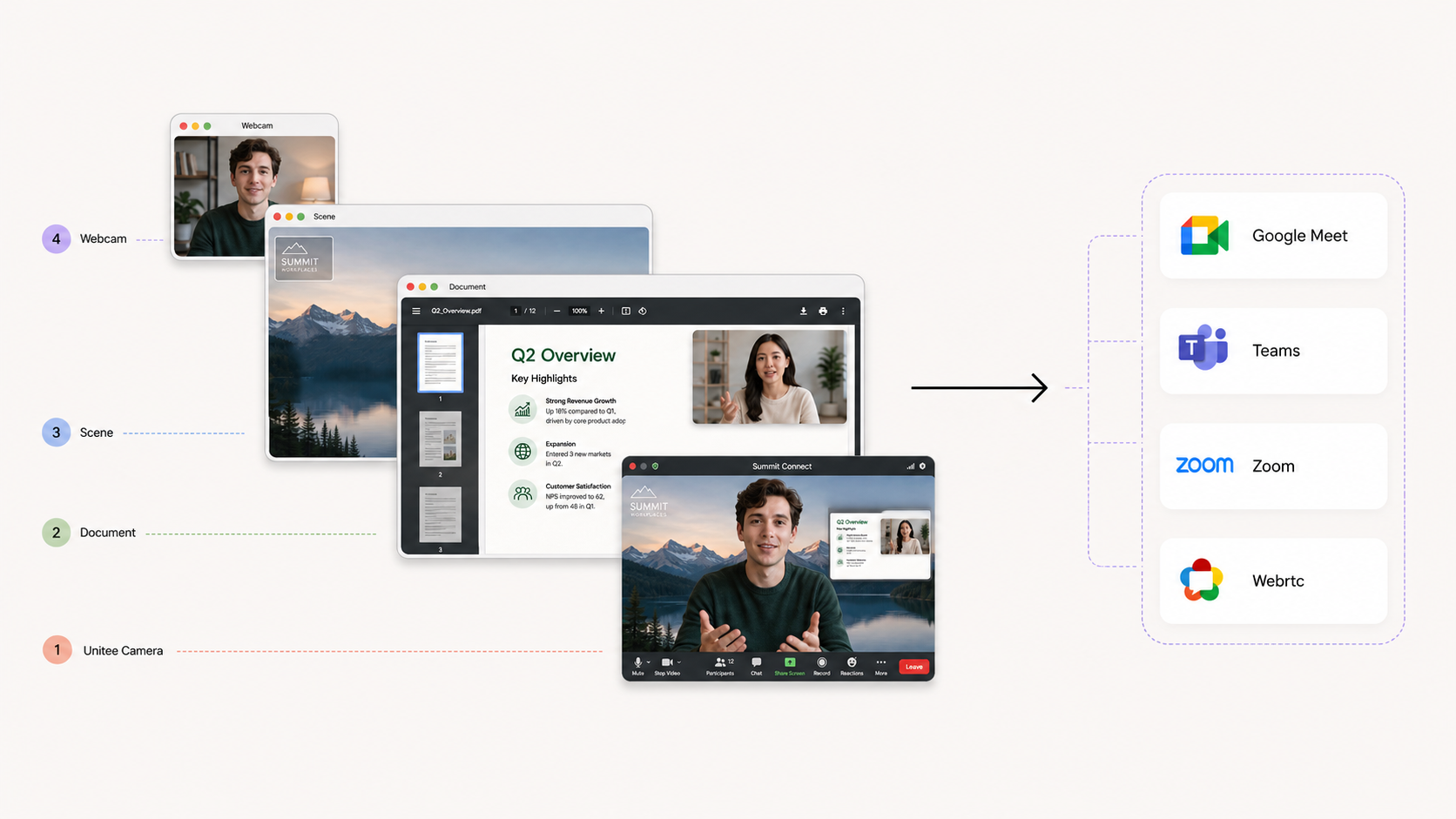
The principle is simple: Unitee-Camera captures the sources available on your computer or connected devices, then assembles them into a customised visual composition. That composition is then broadcast as a virtual camera, ready to be selected directly in your video-conferencing application.
Your audience receives one clean, carefully controlled video feed. Behind that feed, however, you can display your camera, a document, a mobile demonstration, a logo, a custom background, or a shared application.
Unitee-Camera acts as a lightweight, intuitive control room: it lets you create a rich presentation while retaining the simplicity of a standard video call.
Build your image, layer by layer
Every presentation is different. With Unitee-Camera, you can select any source available on your system and add it to your composition: a webcam, an iPhone camera, visual content, a document, or an application capture.
The concept of layers lets you organise each element on screen precisely. Your image can remain in the foreground while a presentation, title, logo, or information panel complements the scene. You decide the position, hierarchy, and space assigned to every piece of content.
This flexibility makes it possible to create visuals suited to any situation: sales meetings, training sessions, product demonstrations, webinars, interviews, conferences, or internal communications.
Enhance your on-screen presence
Unitee-Camera offers a range of filters to improve your video and adapt it to your environment. You can adjust colour, gamma, temperature, sharpness, or even switch to black and white.
The application also lets you choose a virtual background from a dedicated gallery. You can create a consistent visual identity, hide an unsuitable environment, or tailor your setting to the context of your presentation.
Visual headers—such as a logo, signature, title, banner, or any other information—can be added directly to the feed. Your video presence becomes a recognisable, professional communication asset.
Present content without sharing your entire screen
One of Unitee-Camera’s key benefits is the ability to add documents and media directly to your composition. Images, documents stored in the gallery, PDFs, PowerPoint presentations, and 3D models can all be displayed within your video feed.
Rather than switching to screen sharing, you keep your presentation under control: your audience sees both the important content and you, combined in a single feed. This approach reduces distractions, prevents accidental exposure of notifications or confidential information, and makes speaking more fluid.
You can also share an application in a Picture-in-Picture (PiP) window. This is ideal for commenting on an interface, presenting software, or showing a demonstration while remaining visible on screen.
Bring your mobile into the presentation
A mobile demonstration deserves better than a camera pointed at a screen. Unitee-Camera lets you share your smartphone screen to present an iPhone app, a user journey, or a feature in real-world conditions.
Your iPhone’s front and rear cameras can also be used depending on the need: the front camera to speak to your audience, or the rear camera to show an object, a hands-on process, or an environment.
This continuity between desktop and mobile brings a new dimension to product demonstrations, training, and field presentations.
Broadcast for every use case
Unitee-Camera integrates naturally with the leading video-conferencing platforms without changing how teams work. Simply select the Unitee-Camera virtual camera in Google Meet, Teams, Zoom, or Unitee-Meet to broadcast your composition.
RTMP support also opens the door to additional broadcasting use cases, including webinars, live events, and compatible streaming platforms.
A clearer, more human, more memorable presentation
Unitee-Camera does more than replace your webcam: it transforms the way you present remotely. You keep your audience engaged, make content easier to understand, and control your on-screen presence with the precision of a studio.
With one virtual camera, you bring together your presence, documents, demonstrations, and visual identity. Video conferencing becomes a presentation space in its own right—easy to use, yet far more powerful.